
Here’s a truth most video editors don’t want to admit: the reason your edits feel slow isn’t always the footage, the software, or the deadline. It’s the chaos before you even open your timeline. Scattered briefs, missed feedback, no clear phase structure….disorganization is a silent tax on your creative time. The fix isn’t working harder. It’s building a system.
That’s where project management tools come in. The right one doesn’t just track your tasks; it clears your mental space so the actual editing can happen faster and better.
Why Organization = Faster Edits
Every minute spent hunting for a client brief, re-reading a vague email, or second-guessing which revision is current is a minute stolen from your edit. A solid PM workflow means your brain spends less time managing logistics and more time making creative decisions.
According to research from monday.com, the biggest difference between project management tools isn’t the features, but how quickly they remove friction from your process. For video editors specifically, friction usually lives in three places: client communication, asset organization, and revision tracking. The right tool attacks all three.
Trello vs. Notion vs. Monday.com: Which One’s for You?
Trello — Best for Visual Thinkers Who Want to Move Fast
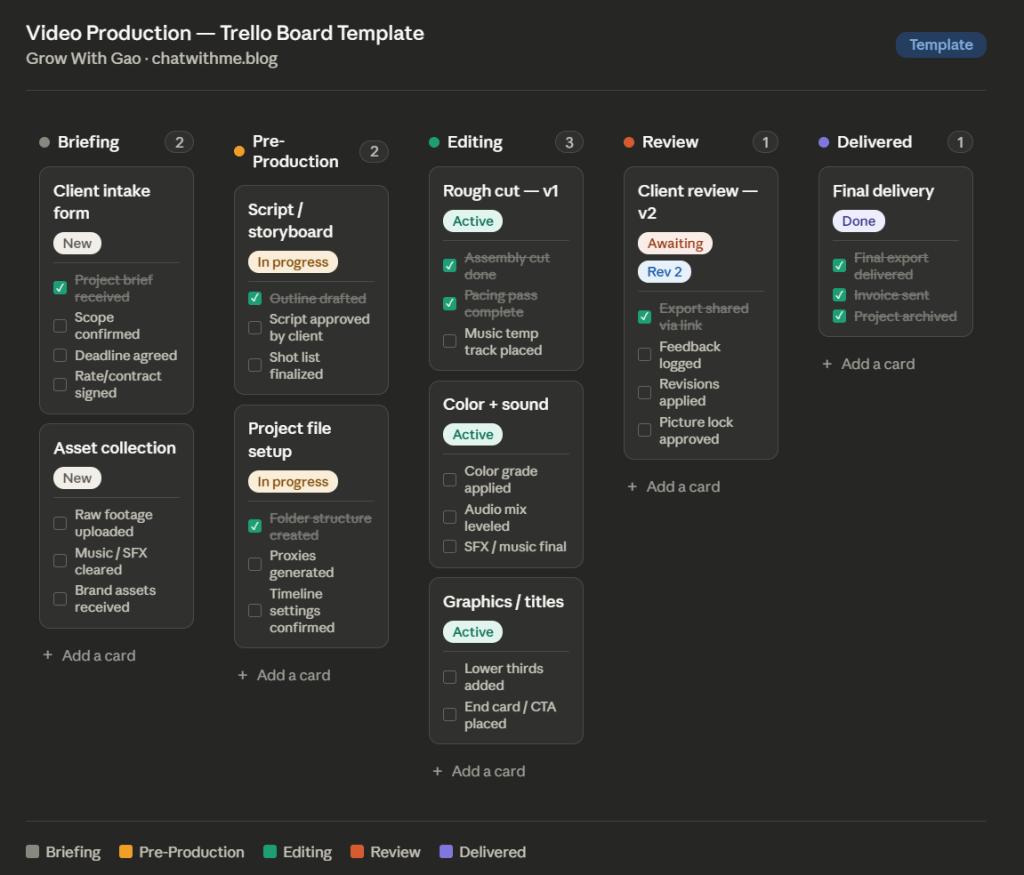
Trello is built around Kanban boards: columns that represent stages, cards that represent tasks. For a solo video editor or small team, it’s perfect. You can set up a board in under 10 minutes with columns like Briefing → Pre-Production → Editing → Review → Delivered and instantly see where every project lives.
The free tier is pretty generous: unlimited cards which can be used to up to 10 boards makes Trello a smart starting point. The tradeoff: Trello doesn’t scale well for complex workflows or heavy documentation. But for editors who want speed over structure, it’s hard to beat.
Best for: Freelance editors, solo operators, quick project pipelines.
Notion — Best for Editors Who Want One Hub for Everything
Notion is less of a task tracker and more of a full creative OS. You can house client briefs, shot lists, revision notes, asset links, and a Kanban board all in the same space. Its blank canvas approach works especially well for creative teams who want context alongside their tasks.
Although the learning curve is real, Notion rewards people who are willing to build their own system. And once it’s set up, you’ll stop bouncing between apps. Notion also integrates natively with Canva, Dropbox, and Calendly, which makes it a natural fit if you’re already working across those platforms.
Best for: Editors who wear multiple hats (producer, editor, client contact) and need everything centralized.
Monday.com — Best for Teams and Client-Facing Workflows
Monday is the most powerful of the three out of the box. Pre-built templates, automation, dashboards, and multiple project views (Gantt, Calendar, Timeline) make it the strongest choice for production teams managing multiple clients or projects simultaneously. It does require more onboarding than Trello, but the payoff in visibility is worth it at scale.
Where Monday shines for video editors is client-facing dashboards where you can give clients view-only access to a project board so they can see status without flooding your inbox. Over 245,000 teams rely on it for exactly this kind of cross-functional coordination.
Best for: Production companies, editors managing 5+ active projects, agency workflows.
Building a Video Production Workflow
Regardless of which tool you choose, the structure matters more than the software. Here’s a framework that works:
Phase 1 — Pre-Production: Brief received, assets collected, timeline confirmed, scope agreed.
Phase 2 — Editing: Rough cut → first review → revisions → picture lock.
Phase 3 — Delivery: Final export, file transfer, client sign-off, archive.
Each phase becomes a column in Trello, a database status in Notion, or a board group in Monday. Every project card or page should contain: the client name, deadline, current revision number, and a link to the latest export. That’s it. Simplicity is the goal.
If you want a deeper look at building intentional workflows as a creative, Cal Newport’s thinking on structuring deep work applies directly here: structure isn’t the enemy of creativity, it’s the container that protects it.
The Bottom Line
Although some might have favorites, there’s no single “best” tool. However, there will always be a best tool for you that fits your preferences. Start with Trello if you’re just getting started or flying solo. Graduate to Notion if you want to centralize everything. Move to Monday when your client load demands it.
What all three share: they only work if you actually use them. A half-built board you check once a week is worse than a sticky note you look at every day. Build the simplest version of your system first, then grow it from there.
Which PM tool do you swear by? Drop your setup in the comments — I’m always looking to refine the workflow.
 Grow with Gao
Leave a comment